Theme: Package, component in PCB
How can I align components horizontally and vertically?
There are many possibilities:
First, you can use the Alignment Assistant, which allows you to automatically place uniform rows, bows, or fields of components.
Otherwise, use a sensible grid size. Always use 0.635 mm (25 mil) in the schematic and also in the layout, unless you are using SMD components, in which case it is best to use 0.1 mm (4 mil).
Press [F8] to activate the crosshairs so that you can check the correct alignment of the components as you place them.
Once the components are in place, you can catch them and then press the [e] key to edit them. At the bottom left select only Packages (or Symbols in the schematic). The Change package dialog box will now appear:
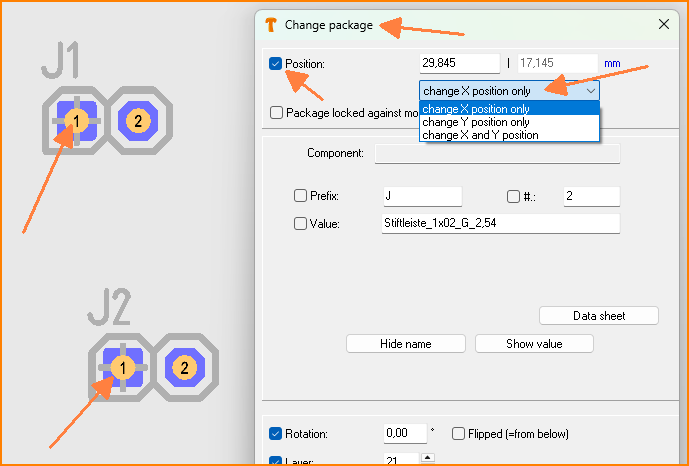 (Fig. 1: Align vertically (X) or horizontally (Y) only)
Check the box next to Position at the top and select Change X position only if you want all elements to start flush at the front, or select Change Y position only if you want all elements to start flush at the top. Then click [OK].
You can now move the components together, as they are all still selected.